NFC Tools
NFC Tag Tools Pro
Official mobile application
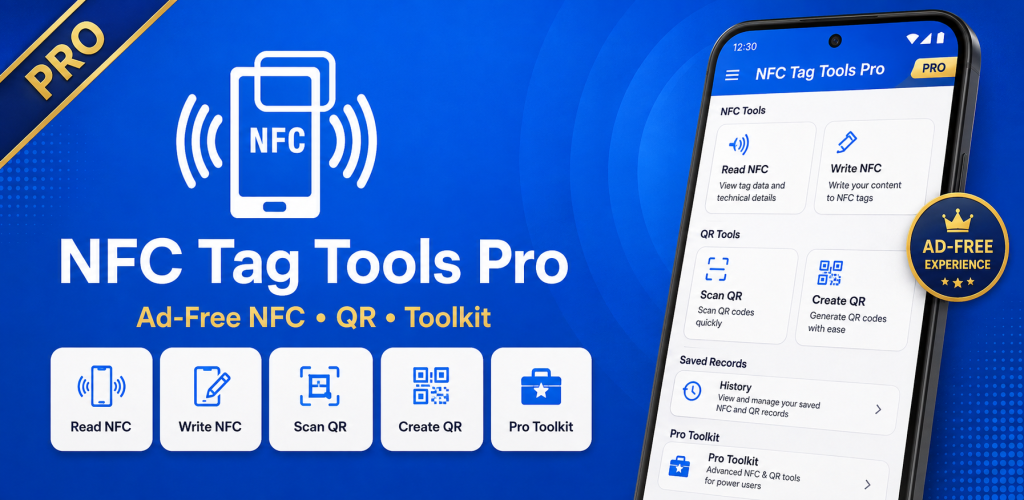
NFC Tag Tools Pro is the Pro edition of the NFC Tag Tools family for Android. It provides a complete set of tools for reading, writing and managing compatible NFC tags, creating multi-record NFC content, saving reusable profiles and working with QR codes. It is designed for users who regularly work with NFC tags and want the dedicated Pro edition of the app.
USD 1.99
Google Play snapshot
Public store data- Rating
- —
- Downloads
- 100+
- Updated
- Aug 24, 2026
Not available yet
Public range
Store listing
Inside the app
App screenshots
Swipe or open a larger view
What is NFC Tag Tools Pro?
NFC Tag Tools Pro is an Android utility for working with compatible NFC tags, stickers and cards. It combines NFC reading, writing, tag management, reusable NFC profiles and QR code tools in one app. Users can inspect supported NFC content, prepare new records and work with common NFC workflows directly from an NFC-enabled Android device.
Built for Regular NFC Workflows
NFC Tag Tools Pro is suitable for users who regularly create, read or manage NFC tags. You can prepare different types of NFC records, organize multiple records in one NFC document, reuse saved profiles and access supported tag management tools without switching between separate apps. The workflow is designed to make repeated NFC tasks easier to manage.
NFC Tag Tools and NFC Tag Tools Pro
NFC Tag Tools and NFC Tag Tools Pro belong to the same product family and provide the same core NFC capabilities. The Pro edition is offered as a separate app for users who prefer the dedicated Pro version while continuing to use the familiar NFC reading, writing, tag management and QR workflows available across the NFC Tag Tools family.
NFC Tools Included in the Pro Edition
NFC Tag Reader
Read compatible NFC tags and inspect available tag details, supported technologies and stored NDEF content from an NFC-enabled Android device.
NFC Tag Writer
Prepare and write supported NFC records to compatible writable tags using text, links, contact details and other supported content types.
Multi-Record NFC Documents
Combine multiple supported NFC records into a single NDEF document and review their order before writing the content to a tag.
NFC Tag Copying
Read supported NFC content from one compatible tag and prepare the available records for writing to another compatible tag.
Reusable NFC Profiles
Save frequently used NFC content as reusable profiles so repeated tag-writing tasks can be prepared more efficiently.
NFC Tag Memory Tools
Inspect available memory information from supported NFC tags and review technical tag data when the tag and Android device support it.
NFC Tag Management
Use supported tools for reviewing tag status and managing compatible writable NFC tags, including available formatting or erase operations.
QR Scanner & Generator
Scan QR codes and generate QR content alongside your NFC workflows without needing a separate QR utility.
Ways to Use NFC Tag Tools Pro
Create Smart NFC Tags
Prepare compatible NFC tags with useful digital content for personal, business or everyday information-sharing workflows.
Share Website Links
Store supported website URLs on NFC tags so compatible devices can quickly access the linked web page.
Share Contact Information
Create supported contact records for convenient sharing of names, phone numbers, email addresses and other contact details.
Prepare Wi-Fi Tags
Create supported NFC records containing Wi-Fi information for use with compatible devices and supported connection workflows.
Reuse Saved NFC Content
Keep frequently used NFC records in reusable profiles so you can prepare similar tags without entering the same information again.
Work with Compatible NTAG Tags
Use supported tools with compatible tags such as NTAG213, NTAG215 and NTAG216, depending on the tag and Android device capabilities.
Manage Writable NFC Tags
Inspect and manage compatible writable tags before reusing them for new NFC records and supported NFC workflows.
Combine NFC and QR Workflows
Use NFC tags and QR codes together when you need more than one convenient way to share or access digital information.
Getting Started with NFC Tag Tools Pro
- 1
Enable NFC on Your Android Device
Make sure your Android phone supports NFC and that NFC is enabled in the device settings before starting an NFC operation.
- 2
Choose an NFC Tool
Open NFC Tag Tools Pro and select the reader, writer, tag management or other supported NFC tool you want to use.
- 3
Prepare Your NFC Content
Enter or select the supported information you want to read, write or manage and review the details before continuing.
- 4
Tap a Compatible NFC Tag
Hold the compatible NFC tag near your Android device and follow the on-screen instructions until the requested NFC operation is completed.
About the Pro Edition
NFC Tag Tools Pro provides the same core NFC functionality as the standard NFC Tag Tools app while being offered as a separate Pro edition. You do not need both editions to perform the same core NFC tasks. Choose the edition that best matches how you prefer to access the app.
Frequently asked questions
What is NFC Tag Tools Pro?
NFC Tag Tools Pro is the Pro edition of NFC Tag Tools for Android. It provides NFC reading, writing, tag management, reusable profiles, multi-record NFC support and QR code tools.
What is the difference between NFC Tag Tools and NFC Tag Tools Pro?
Both apps belong to the same product family and provide the same core NFC functionality. NFC Tag Tools Pro is offered as a separate Pro edition for users who prefer that version of the app.
Do I need both NFC Tag Tools and NFC Tag Tools Pro?
No. Because both editions provide the same core NFC capabilities, you can choose the edition that best fits how you prefer to use the app.
Can NFC Tag Tools Pro read and write NFC tags?
Yes. NFC Tag Tools Pro can read supported NFC content and write supported records to compatible writable NFC tags using an NFC-enabled Android device.
Does NFC Tag Tools Pro support multi-record NFC tags?
Yes. You can prepare multiple supported records in a single NFC document, provided the target NFC tag has enough available capacity.
Which NFC tags work with NFC Tag Tools Pro?
The app works with many Android-compatible NFC tags. Common compatible examples include NTAG213, NTAG215 and NTAG216, although available operations depend on the tag technology and Android device.
Can NFC Tag Tools Pro copy NFC tag content?
The app can read supported NFC content from compatible tags and prepare available records for writing to another compatible tag. Protected, hardware-specific or unsupported data may not be copyable.
Does NFC Tag Tools Pro include QR code tools?
Yes. NFC Tag Tools Pro includes QR code scanning and generation tools that can be used alongside its NFC features.
Ready to try NFC Tag Tools Pro?
Use the official store link to view the latest release and install securely.
Open official store ↗