NFC Tools
NFC Tag Tools: Reader & Writer
Official mobile application
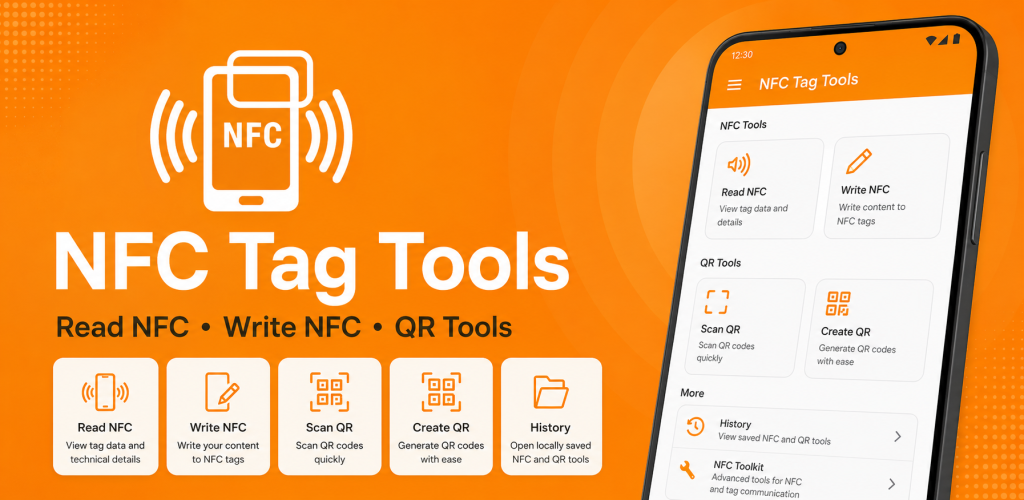
NFC Tag Tools is an Android NFC reader, writer and automation utility for working with compatible NFC tags. Read and edit multi-record NDEF content, copy supported tag data, save reusable profiles, inspect and manage compatible NTAG tags, and create Task Profiles with Smart Actions and conditions. You can run automation tasks directly or write them to compatible NFC tags, while built-in QR tools let you scan, generate and customize QR codes.
Google Play snapshot
Public store data- Rating
- 4.5
- Downloads
- 50K+
- Updated
- Aug 24, 2026
65 ratings
Public range
Store listing
Inside the app
App screenshots
Swipe or open a larger view
What is NFC Tag Tools?
NFC Tag Tools is an Android utility for reading, writing, copying and managing compatible NFC tags. It supports multi-record NDEF content, reusable NFC profiles, tag memory tools and common record types such as text, URLs, phone numbers, SMS, email, Wi-Fi, contacts and locations. The app also includes NFC Automation for creating and running Smart Action workflows, along with QR scanning and custom QR generation tools.
NFC Automation and Smart Actions
NFC Automation lets you create reusable Task Profiles containing one or more ordered actions. Tasks can open apps, websites, maps or Android settings, prepare messages, share or copy text, work with contacts or Wi-Fi and perform other supported actions. Optional IF/ELSE conditions and STOP or CONTINUE behavior allow more flexible workflows. Preview or run a task directly from the app, or write the encoded task to a compatible NFC tag for later use.
QR Code Tools and Everyday Use
In addition to NFC features, NFC Tag Tools includes QR code scanning and generation tools. You can scan QR codes, create QR codes for supported content and use QR alongside NFC for sharing information such as links, contact details and other useful data. This makes the app suitable for personal, business and general-purpose NFC and QR workflows.
Key Features of NFC Tag Tools
NFC Tag Reader
Read compatible NFC tags and inspect ordered NDEF records, tag technologies, capacity, writable status and other available tag information.
NFC Writer & Multi-Record Editor
Create, edit and write supported multi-record NFC content while preserving record order and checking tag compatibility, capacity and writability.
Copy & Continuous Copy
Copy supported NDEF content between compatible NFC tags and use continuous workflows when writing the same supported content to multiple tags.
NFC Profiles & History
Save reusable multi-record profiles and reopen locally stored NFC history for reviewing, editing or writing supported content again.
NFC Automation & Task Profiles
Create ordered Smart Action workflows with optional IF/ELSE conditions, run them directly or encode supported automation tasks onto compatible NFC tags.
NTAG Memory & Tag Management
Inspect compatible NTAG213, NTAG215 and NTAG216 memory and access supported formatting, erase, read-only and tag management tools.
Advanced NFC Commands
Use advanced command tools for supported NFC technologies including NfcA, NfcV and IsoDep with HEX input and response information.
QR Scanner & Custom QR Maker
Scan QR codes, generate QR content and create customized QR codes with supported colors, styles, shapes and logos.
Supported NFC Record Types
Text
Create and write plain text records to compatible NFC tags for notes, labels, instructions and other simple information.
URL
Store website links on compatible NFC tags so users can quickly open a web page after scanning the tag.
Phone Number
Save a phone number to a compatible NFC tag for quick access to calling actions on supported Android devices.
SMS
Create NFC records containing a phone number and optional message text for supported SMS actions.
Write email information such as an address, subject and message content to compatible NFC tags.
Wi-Fi
Store supported Wi-Fi network information on compatible NFC tags for easier connection on supported devices.
Contact / vCard
Save supported contact details such as name, phone number and email address for convenient contact sharing.
Location
Write geographic location information to a compatible NFC tag so supported devices can open the saved location.
How to Write an NFC Tag with NFC Tag Tools
- 1
Choose the NFC Record Type
Open NFC Tag Tools and select the type of content you want to write, such as text, URL, phone, SMS, email, Wi-Fi, contact or location.
- 2
Enter Your Content
Add the information you want to store on the NFC tag and review the details before continuing.
- 3
Add More Records if Needed
Create additional supported records if you want to store multiple types of content in the same NFC document.
- 4
Start the NFC Write Process
Choose the write option and follow the on-screen instructions to prepare the app for an NFC tag.
- 5
Tap the NFC Tag
Hold a compatible writable NFC tag near your Android device until the app detects the tag and completes the write process.
- 6
Verify the Written Tag
Read the NFC tag again to confirm that the expected records were written correctly and can be accessed from the tag.
NFC and Automation Compatibility
NFC features depend on your Android device, NFC hardware and the type of tag being used. Automation behavior can also depend on the Android version, installed apps, device capabilities and permissions required by individual actions. Preview automation tasks before writing them to NFC, and use a compatible writable tag with enough capacity for the encoded task.
How to Create an NFC Automation Task
- 1
Create a Task Profile
Open the Automation section and create a new Task Profile for the workflow you want to run directly or write to a compatible NFC tag.
- 2
Add Smart Actions
Add one or more supported actions and arrange them in the order you want the automation workflow to execute.
- 3
Add Conditions if Needed
Use supported IF/ELSE conditions when you want the workflow to choose different actions depending on specified conditions.
- 4
Preview and Run the Task
Review the task, encoded size and configured actions, then run the workflow directly to confirm that it behaves as expected.
- 5
Write the Task to NFC
Choose the NFC write option and tap a compatible writable NFC tag to encode the supported automation task after the required checks.
Frequently asked questions
Can Android phones read NFC tags?
Yes. Android phones with NFC hardware can read compatible NFC tags. NFC must be enabled on the device, and available NFC features depend on the phone and tag type.
Can NFC Tag Tools write NFC tags?
Yes. The app can write supported NDEF records to compatible writable NFC tags. Tags that are locked, read-only or unsupported cannot be rewritten.
Which NFC tags can I use?
The app works with many Android-compatible NFC tags. Common examples include NTAG213, NTAG215 and NTAG216, although available features depend on the tag technology and Android device.
Can I copy an NFC tag?
NFC Tag Tools can copy supported NFC content from compatible tags and prepare it for writing to another compatible tag. Some protected, hardware-specific or non-copyable data cannot be duplicated.
Can I write Wi-Fi information to an NFC tag?
Yes. Compatible NFC tags can be prepared with supported Wi-Fi information so that the stored record can be read by compatible devices.
Does NFC Tag Tools support multiple records on one tag?
Yes. You can create and work with multiple supported NDEF records in a single NFC document, provided the target tag has enough available capacity.
Does the app include QR tools?
Yes. NFC Tag Tools includes QR code scanning and generation alongside its NFC features.
What is NFC Automation in NFC Tag Tools?
NFC Automation lets you create reusable Task Profiles containing ordered Smart Actions. A task can be previewed and run directly from the app or written to a compatible NFC tag for later use.
Can an NFC automation task contain multiple actions and conditions?
Yes. Task Profiles can contain multiple ordered supported actions and can use supported IF/ELSE conditions to control how the workflow proceeds. Available actions and behavior depend on the Android device and app configuration.
Ready to try NFC Tag Tools: Reader & Writer?
Use the official store link to view the latest release and install securely.
Open official store ↗