PDF Tools
PDF Tools Lite
Official mobile application
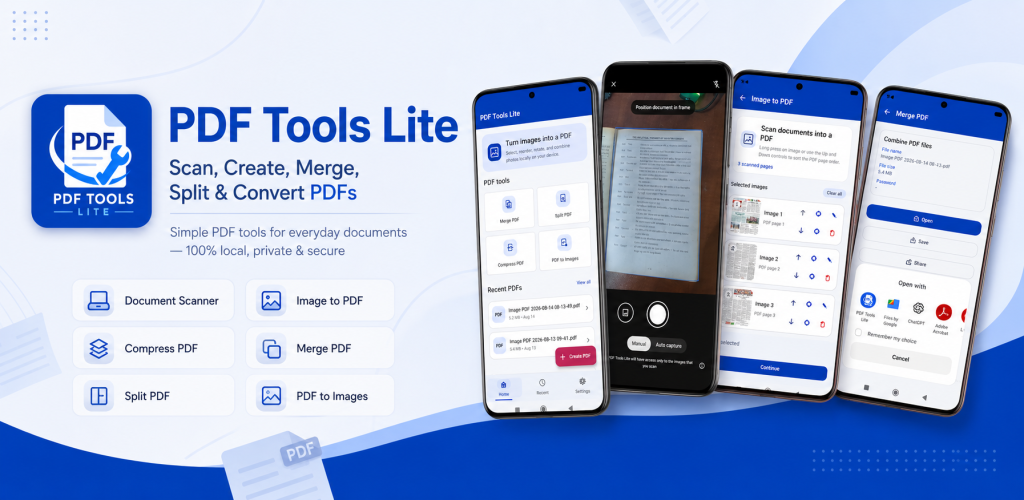
PDF Tools Lite is a lightweight PDF scanner and document utility for Android. Scan paper documents with your camera, convert photos into PDF files, merge multiple PDFs, split selected pages, compress large documents and convert PDF pages into images. You can also preview, organize, rename, share and view PDF files directly on your device with a simple workflow designed for everyday document tasks.
Google Play snapshot
Public store data- Rating
- —
- Downloads
- 10+
- Updated
- Aug 14, 2026
Not available yet
Public range
Store listing
Inside the app
App screenshots
Swipe or open a larger view
What is PDF Tools Lite?
PDF Tools Lite is an Android document utility that brings essential PDF creation and management tools into one lightweight app. It can scan paper documents, create PDFs from images, combine or separate PDF files, reduce file size, convert PDF pages to images and open generated documents in a built-in viewer. The app is designed for everyday school, work, business and personal document tasks.
Scan Documents and Convert Images to PDF
Use your Android camera to scan notes, receipts, forms, assignments, applications and other paper documents. Automatic edge detection and perspective correction help prepare cleaner document captures, while preview tools let you crop, rotate, enhance and reorder pages before creating the final PDF. Existing photos can also be imported from your gallery and combined into a single PDF document.
Merge, Split, Compress and Manage PDF Files
PDF Tools Lite includes practical tools for working with existing PDF documents. Combine several PDF files into one document, extract selected pages or page ranges, reduce PDF file size for easier sharing and convert PDF pages into image files. Generated documents can also be opened, renamed, shared, deleted and organized from within the app.
Essential PDF Tools
Document Scanner
Scan paper documents with your Android camera using automatic edge detection and perspective correction for cleaner document captures.
Image to PDF
Select one or more images, arrange them in the preferred order and create a single PDF document directly on your Android device.
Merge PDF
Combine multiple PDF files into one document and arrange the selected files in the order you want before merging.
Split PDF
Extract selected pages or page ranges from an existing PDF and save the chosen pages as a separate PDF document.
Compress PDF
Reduce PDF file size to make documents easier to store, upload, email or share when working with file-size limits.
PDF to Images
Convert pages from a PDF document into image files for easier saving, viewing or sharing.
PDF Viewer
Open PDF documents directly inside the app and zoom in or out when reading or checking generated files.
PDF File Management
Browse generated PDFs, rename files, delete unwanted documents, share PDFs and access recently created files from one place.
Ways to Use PDF Tools Lite
Scan Notes and Assignments
Turn paper notes, assignments and study materials into PDF documents that are easier to store, submit or share.
Prepare Application Documents
Scan forms, certificates and supporting documents and create PDF files for supported online application workflows.
Convert Photos to PDF
Combine document photos or gallery images into an ordered PDF when you need to submit or share multiple pages together.
Combine Multiple Documents
Merge separate PDF files into one document when several related files need to be kept or submitted together.
Extract Only the Pages You Need
Split an existing PDF and save selected pages when you do not need to share or keep the entire document.
Reduce Files Before Uploading
Compress large PDF documents when a website, email service or submission form has a file-size limit.
Save PDF Pages as Images
Convert PDF pages into image files when you need individual pages in an image format for viewing or sharing.
Organize Everyday Documents
Keep recently created PDFs accessible, rename files clearly and share or delete documents as your local collection changes.
How to Scan a Document to PDF on Android
- 1
Open the Document Scanner
Open PDF Tools Lite and choose the document scanning option to start capturing paper documents with your Android camera.
- 2
Capture Your Document
Position the document inside the camera view and capture the page while the app detects the document area.
- 3
Review and Adjust the Page
Review the captured page and use available crop, rotation, enhancement or perspective tools before continuing.
- 4
Add More Pages
Capture or import additional pages when you need to create a multi-page PDF and arrange them in the preferred order.
- 5
Create the PDF
Review the selected pages and generate the final PDF document when everything is arranged correctly.
- 6
Open, Save or Share
Open the generated PDF in the built-in viewer or use the available options to save, organize or share the document.
Local PDF Processing
Core PDF creation and processing in PDF Tools Lite is performed locally on your Android device. The app is designed to work with the files you select or create without requiring broad storage permission. Available document quality and processing results can vary depending on the source image, PDF file and device capabilities.
Frequently asked questions
What is PDF Tools Lite?
PDF Tools Lite is an Android PDF scanner and document utility for scanning documents, converting images to PDF, merging and splitting PDFs, compressing files, converting PDF pages to images and managing generated documents.
Can PDF Tools Lite scan documents to PDF?
Yes. You can capture paper documents with your Android camera and create PDF files using supported document detection, perspective correction and page preparation tools.
Can I convert multiple images into one PDF?
Yes. PDF Tools Lite can import multiple images, let you arrange their order and combine them into a single PDF document.
Can PDF Tools Lite merge PDF files?
Yes. You can select multiple PDF documents, arrange them in the preferred order and merge them into one PDF file.
Can I split pages from a PDF?
Yes. The Split PDF tool can extract selected pages or page ranges from an existing document and save them as a separate PDF.
Can PDF Tools Lite compress PDF files?
Yes. The app includes PDF compression for reducing document file size when you need a smaller file for storage, uploading, email or sharing.
Can PDF Tools Lite convert PDF pages to images?
Yes. PDF pages can be converted into image files for supported viewing, saving and sharing workflows.
Does PDF Tools Lite process PDFs on my device?
Core PDF creation and processing are performed locally on the Android device according to the current app design, so common PDF tasks do not require uploading your documents to a cloud service.
Ready to try PDF Tools Lite?
Use the official store link to view the latest release and install securely.
Open official store ↗