Network Tools
Ping Tools Pro: Network Tools
Official mobile application
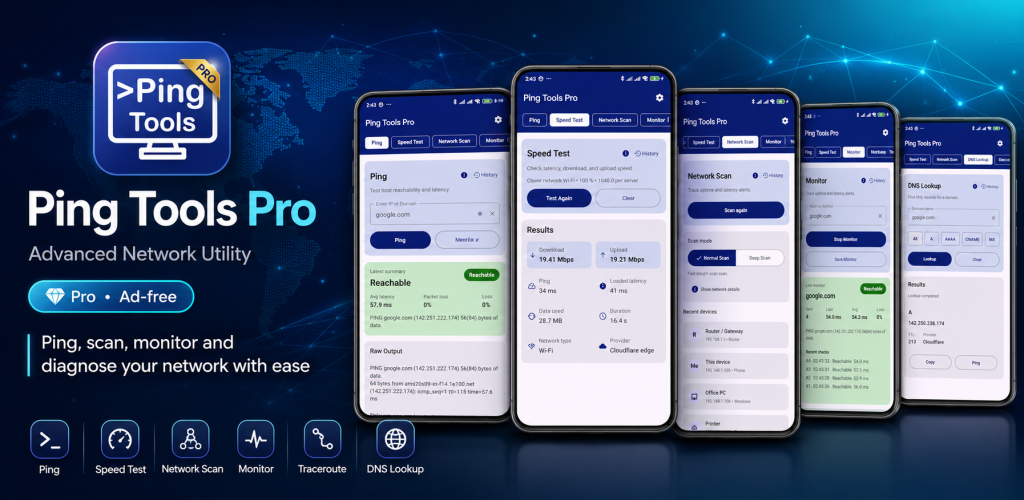
Ping Tools Pro is the Pro edition of the Ping Tools network utility for Android. It brings together practical tools for checking connectivity, analyzing WiFi, discovering local network devices and troubleshooting network problems. Use ping tests, traceroute, DNS lookup, port scanning, speed tests, host monitoring and other network diagnostics from one dedicated Pro app.
USD 1.99
Google Play snapshot
Public store data- Rating
- —
- Downloads
- 10+
- Updated
- Sep 2, 2026
Not available yet
Public range
Store listing
Inside the app
App screenshots
Swipe or open a larger view
What is Ping Tools Pro?
Ping Tools Pro is an Android network diagnostics app for checking connections, investigating network performance and working with local WiFi networks. It combines common network utilities in one place so you can test hosts, inspect wireless conditions, discover devices and investigate connectivity problems without moving between multiple apps.
Built for Regular Network Troubleshooting
Ping Tools Pro is useful when you regularly need to check routers, websites, servers, IP addresses or local network devices. You can measure latency and packet loss, inspect network routes, review DNS information, check reachable ports, analyze WiFi conditions and compare diagnostic results when investigating slow or unstable connections.
Ping Tools and Ping Tools Pro
Ping Tools and Ping Tools Pro belong to the same product family and provide the same core network diagnostic capabilities. Ping Tools Pro is offered as a separate Pro edition for users who prefer the dedicated Pro version while continuing to use the familiar ping, WiFi analysis, network scanning and troubleshooting tools available across the Ping Tools family.
Network Tools Included in the Pro Edition
Ping IP & Domain
Test supported IP addresses, domains, routers or servers to check reachability and review response time, latency and packet loss information.
WiFi Analyzer
Inspect nearby wireless networks, signal strength and channel information to better understand the WiFi environment around your Android device.
Network Scanner
Discover devices visible on your current WiFi or LAN and review available network information for detected devices.
Traceroute
Inspect the route network traffic takes between your Android device and a supported remote host when investigating connectivity problems.
DNS Lookup
Retrieve available DNS information for domains to help investigate name resolution and other DNS-related network issues.
Port Scanner
Check reachable TCP ports on devices or systems that you own or are authorized to test.
Internet Speed Test
Measure available internet connection performance and review speed and latency information when checking network quality.
Host Monitor
Monitor supported websites, domains, servers or IP addresses and review their recent availability and latency information.
Ways to Use Ping Tools Pro
Check Internet Connectivity
Use ping and other diagnostics to determine whether an internet host, website or server is reachable from your current connection.
Troubleshoot High Latency
Measure response times and packet loss to help investigate slow, delayed or unstable network connections.
Analyze WiFi Conditions
Review nearby WiFi networks, signal levels and channel usage when investigating wireless coverage or congestion.
Discover Local Devices
Scan your current WiFi or LAN to identify devices visible on the local network and review available device information.
Inspect Network Routes
Use traceroute to examine the path toward a remote destination when a connection is slow or cannot be reached as expected.
Check DNS Resolution
Look up DNS information for a domain when troubleshooting website access, hostname resolution or related network problems.
Check Network Services
Use port scanning on authorized systems to check whether expected TCP services appear reachable from your device.
Review Diagnostic History
Refer to supported saved results and previous network checks when comparing network behavior or troubleshooting recurring issues.
Getting Started with Ping Tools Pro
- 1
Connect to Your Network
Connect your Android device to WiFi or mobile data depending on the network or internet connection you want to examine.
- 2
Choose a Network Tool
Open Ping Tools Pro and select ping, WiFi Analyzer, network scanning, traceroute, DNS lookup or another available diagnostic tool.
- 3
Enter or Select a Target
Provide the required IP address, domain or network target when needed, or select the local network analysis tool you want to run.
- 4
Run the Diagnostic
Start the selected test and allow Ping Tools Pro to collect the available network information for that operation.
- 5
Review the Results
Use the displayed latency, connectivity, WiFi, route, DNS or other diagnostic information to better understand the network condition.
About the Pro Edition
Ping Tools Pro provides the same core network diagnostic functionality as the standard Ping Tools app while being offered as a separate Pro edition. You do not need both editions to perform the same core network tasks. Choose the edition that best matches how you prefer to access and use the app.
Frequently asked questions
What is Ping Tools Pro?
Ping Tools Pro is the Pro edition of Ping Tools for Android. It includes network diagnostics such as ping tests, WiFi analysis, network scanning, traceroute, DNS lookup, port scanning, speed testing and host monitoring.
What is the difference between Ping Tools and Ping Tools Pro?
Both apps belong to the same product family and provide the same core network diagnostic features. Ping Tools Pro is offered as a separate Pro edition for users who prefer that version of the app.
Do I need both Ping Tools and Ping Tools Pro?
No. Both editions provide the same core network tools, so you can choose the edition that best fits how you prefer to use the app.
Can Ping Tools Pro ping IP addresses and domains?
Yes. Ping Tools Pro can ping supported IP addresses and domains to check reachability and review information such as latency, response time and packet loss.
Does Ping Tools Pro include a WiFi analyzer?
Yes. The WiFi Analyzer can help you inspect nearby wireless networks, signal strength, channel information and other available WiFi conditions.
Can Ping Tools Pro find devices on my WiFi?
Yes. The network scanner can discover devices visible on your current WiFi or LAN. The information available for each device depends on the network and device configuration.
Does Ping Tools Pro include traceroute and DNS lookup?
Yes. Ping Tools Pro includes traceroute for inspecting network paths and DNS lookup for retrieving available DNS information for supported domains.
Can Ping Tools Pro scan ports?
Yes. Ping Tools Pro includes a TCP port scanner for checking reachable ports on devices and systems that you own or are authorized to test.
Ready to try Ping Tools Pro: Network Tools?
Use the official store link to view the latest release and install securely.
Open official store ↗