Network Tools

WiFi Guardian Pro: Analyzer
Official mobile application
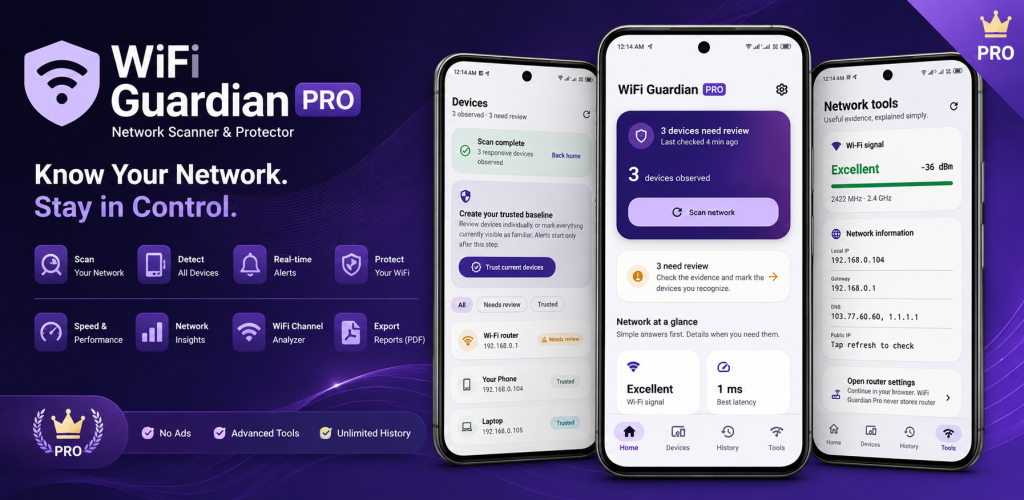
WiFi Guardian Pro is an ad-free WiFi analyzer and local network scanner for Android. Discover devices connected to your WiFi, analyze nearby wireless networks, review channel usage and signal strength, organize trusted devices, run network diagnostics and monitor changes to your home network. The Pro edition includes unlimited scans without requiring a monthly or yearly Premium subscription.
Google Play snapshot
Public store data- Rating
- —
- Downloads
- 0+
- Updated
- Aug 22, 2026
Not available yet
Public range
Store listing
Inside the app
App screenshots
Swipe or open a larger view
What is WiFi Guardian Pro?
WiFi Guardian Pro is an Android network utility for analyzing wireless networks and understanding the devices connected to your WiFi. It combines WiFi analysis, local device discovery, signal monitoring, network diagnostics and device organization in one app, making it useful for regularly checking and troubleshooting a home or private WiFi network.
Ad-Free WiFi Analysis and Network Scanning
WiFi Guardian Pro provides an ad-free experience for users who regularly analyze WiFi conditions or scan their local network. You can inspect nearby wireless networks, review channels and signal strength, discover visible connected devices and repeat supported network scans without the interruptions associated with advertising.
Monitor and Organize Your Home Network
Use WiFi Guardian Pro to keep your local network easier to understand over time. Familiar devices can be marked as trusted, unfamiliar devices can be reviewed, custom device names can be assigned and recent activity can be checked. Local encrypted history and supported monitoring features provide additional context when devices or network conditions change.
WiFi & Network Tools in the Pro Edition
WiFi Analyzer
Analyze nearby wireless networks and review available information such as WiFi names, signal strength, channels, frequencies and security details.
WiFi Channel Analysis
Compare nearby networks and review channel usage and congestion to better understand crowded wireless environments.
Signal Strength Monitor
Monitor WiFi signal strength and evaluate how wireless reception changes across different locations around your network.
Network Scanner
Scan your active private WiFi network to discover phones, computers, TVs, routers and other devices currently visible on the local network.
Connected Device Details
Review available device information including local IP address, MAC address, estimated manufacturer and device type when available.
Device Diagnostics
Ping supported connected devices, review latency and run limited common-port diagnostics on devices within your private local network.
Network Monitoring
Monitor changes to your home WiFi network and review supported alerts when newly observed devices need attention.
Reports & Local History
Review encrypted local scan history and export supported network information as PDF reports or CSV device data.
Ways to Use WiFi Guardian Pro
See Who Is Connected to Your WiFi
Scan your active home or private WiFi network and review devices currently visible on the same local connection.
Investigate Weak WiFi Signal
Review signal strength and wireless information when WiFi coverage feels weak or inconsistent in different areas.
Check Crowded WiFi Channels
Compare nearby networks and channel activity when investigating interference or congestion in your wireless environment.
Identify Familiar Devices
Mark recognized network devices as trusted and assign useful names so they are easier to identify during future scans.
Review New Devices
Keep newly observed or unfamiliar devices available for review without automatically assuming that an unknown device is unsafe.
Troubleshoot Local Devices
Use supported ping and latency checks when investigating whether a visible device on your private network is responding normally.
Track Network Changes
Use monitoring, recent device activity and local scan history to better understand changes occurring on your home WiFi network.
Export Network Information
Create supported PDF reports or CSV exports when you need to keep or review network and device information outside the app.
Getting Started with WiFi Guardian Pro
- 1
Connect to Your WiFi
Connect your Android phone to the private WiFi network that you want to analyze or scan for visible devices.
- 2
Review Your Network
Open WiFi Guardian Pro and review the available signal, router and current network information on the home screen.
- 3
Scan Connected Devices
Run a local network scan to discover devices that are currently visible on the same WiFi connection.
- 4
Analyze WiFi Conditions
Use the WiFi Analyzer to review nearby networks, channels, signal strength and supported wireless information.
- 5
Organize and Monitor
Mark familiar devices as trusted, review unfamiliar devices and use supported history or monitoring features to follow changes over time.
About the Pro Experience
WiFi Guardian Pro provides an ad-free experience with unlimited supported network scans and Pro features without requiring a monthly or yearly Premium subscription. Network scan results can still vary because Android restrictions, sleeping devices, firewalls, router isolation and device privacy features may prevent some devices from appearing in every scan.
Frequently asked questions
What is WiFi Guardian Pro?
WiFi Guardian Pro is an ad-free Android WiFi analyzer and local network scanner for discovering visible connected devices, analyzing wireless networks, checking channels and signal strength and monitoring your home network.
What is the difference between WiFi Guardian and WiFi Guardian Pro?
Both apps provide the same core WiFi analysis and local network scanning capabilities. WiFi Guardian Pro is the dedicated Pro edition with an ad-free experience and unlimited supported network scans.
Does WiFi Guardian Pro require a subscription?
No. WiFi Guardian Pro is offered as a separate Pro edition and does not require a monthly or yearly Premium subscription.
Can WiFi Guardian Pro show who is connected to my WiFi?
Yes. WiFi Guardian Pro can scan your active private local network and display devices that are currently visible on the same WiFi connection.
Does WiFi Guardian Pro include a WiFi analyzer?
Yes. The WiFi Analyzer can display nearby wireless networks, signal strength, channels, frequencies and other supported WiFi information.
Can WiFi Guardian Pro help find crowded WiFi channels?
Yes. Channel information and nearby network analysis can help you understand wireless channel usage, overlap and congestion around your network.
Can WiFi Guardian Pro monitor new devices?
WiFi Guardian Pro includes supported monitoring features for newly observed devices and can help you organize familiar, unfamiliar and trusted devices on your local network.
Does WiFi Guardian Pro keep network scan history?
Yes. WiFi Guardian Pro can keep supported local scan history and device information so you can review recent network activity and changes over time.
Ready to try WiFi Guardian Pro: Analyzer?
Use the official store link to view the latest release and install securely.
Open official store ↗