
WiFi Guardian Pro: Analyzer
Official mobile application
WiFi analyzer & network scanner to find devices, check channels, signal and IP.
Google Play snapshot
Public store data- Rating
- —
- Downloads
- 0+
- Updated
- Aug 22, 2026
Not available yet
Public range
Store listing
Inside the app
App screenshots
Swipe or open a larger view
About WiFi Guardian Pro: Analyzer
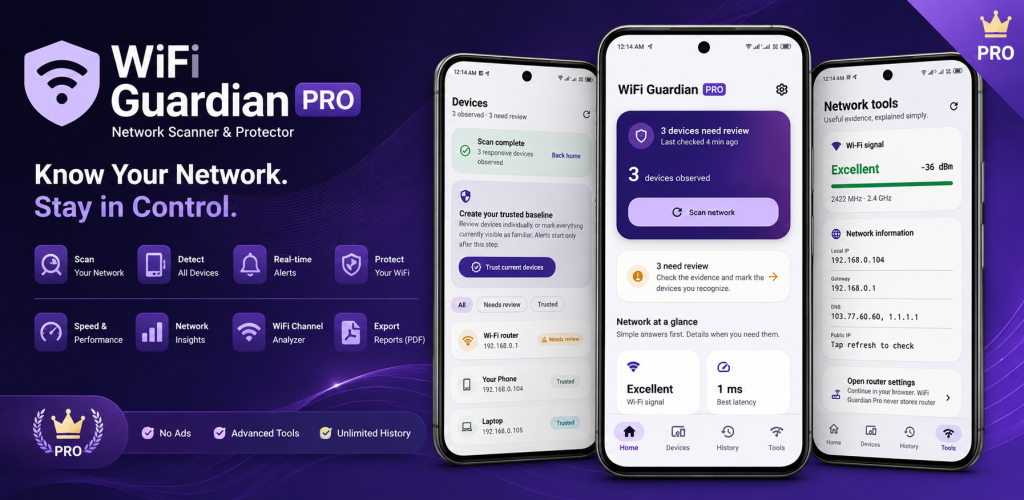
WiFi Guardian Pro helps you discover devices connected to your WiFi and understand how your wireless network is performing.
It combines a WiFi analyzer, WiFi scanner and network scanner in one simple app. Find connected devices, analyze nearby WiFi networks, check WiFi channels, monitor signal strength and review useful network information without ads.
Wondering “Who is connected to my WiFi?” or trying to understand weak WiFi signal and crowded channels? WiFi Guardian Pro gives you essential WiFi tools in one place.
WiFi Analyzer
Analyze nearby WiFi networks and understand your wireless environment.
-
Scan nearby WiFi networks
-
View WiFi names and signal strength
-
Check WiFi channels and frequency
-
Compare nearby networks
-
Analyze channel usage and congestion
-
Monitor WiFi signal strength
-
View WiFi security information when available
-
Check supported 2.4 GHz and 5 GHz bands
Use the WiFi Analyzer to investigate interference, crowded channels and weak WiFi coverage.
WiFi Network Scanner
Scan your current local WiFi network and discover connected devices.
-
Scan your WiFi network with one tap
-
Find phones, laptops, TVs and smart devices
-
View device name, local IP and MAC address when available
-
See estimated manufacturer and device type
-
Identify your router, gateway and current phone
-
Review devices marked Trusted, Unknown or Needs Review
Android restrictions, sleeping devices, firewalls and router isolation may prevent some devices from appearing in every scan.
Who Is Connected to My WiFi?
Review devices detected on your network, including phones, tablets, computers, smart TVs, routers, cameras, speakers, printers, game consoles and smart-home devices.
An unfamiliar device is not automatically dangerous. WiFi Guardian Pro gives you useful information so you can decide whether it needs review.
Organize Connected Devices
-
Mark familiar devices as Trusted
-
Review unfamiliar or newly detected devices
-
Add custom device names
-
View first-seen and last-seen information
-
Check recent device activity
WiFi Signal & Network Information
-
WiFi signal strength
-
WiFi channel information
-
Router and gateway address
-
Local and public IP address
-
DNS information
-
Network connection details
-
Quick access to your router admin page
Use signal and router-latency information to investigate weak coverage or slow WiFi.
Device Diagnostics
-
Ping connected devices
-
Check device latency
-
Run limited common-port diagnostics
-
View available vendor and device information
WiFi Guardian Pro scans only the active private local network. It is not a public-network scanner or penetration-testing tool.
Monitoring & Alerts
-
Check for newly observed devices
-
Receive alerts for devices that need review
-
Monitor changes to your home WiFi network
Private Local History
Your device inventory, trust choices and scan history are stored locally in an encrypted database.
-
Seven days of encrypted scan history
-
No account required
-
No cloud sync
-
Delete local network data from Settings
MAC addresses are masked by default in exported reports.
Export Network Reports
-
Export reports as PDF
-
Export device data as CSV
-
Keep MAC addresses masked by default
Connected Devices Widget
Add the Connected Devices widget to your Android home screen for quick access to your latest network status.
Pro Experience
WiFi Guardian Pro provides an ad-free experience with unlimited scans and Pro features. No monthly or yearly Premium subscription is required.
WiFi Guardian Pro does not claim to detect every device with 100% accuracy, prove that an unfamiliar device is malicious, block devices directly from every router, or replace your router’s official connected-client list.
Find devices connected to your WiFi, analyze WiFi channels, monitor signal strength and keep your home network organized with WiFi Guardian Pro.
Ready to try WiFi Guardian Pro: Analyzer?
Use the official store link to view the latest release and install securely.
Open official store ↗